🚀 Master CI Relations Like a Pro! 🔗💡
Ask the Community | Help Others
Recently active
Should the location and department be automatically picked up from Active Directory in the asset inventory, including those attributes? Is this feasible or not?
Currently,Adobe Acrobat Pro version software and Adobe Free VersionSoftware installed package is showing as Adobe Acrobat(64 - bit) in systems control panel(i.e Program/Features).Due to this , In summit application we couldn’t able to fetch or differentiate the details of Acrobat Adobe pro version software details and Acrobat Free version software. However, in software license mapping we couldn't able to map the exact Adobe Acrobat Pro version software. Hence couldn't able to track the software compliance for Adobe Acrobat Pro version software.
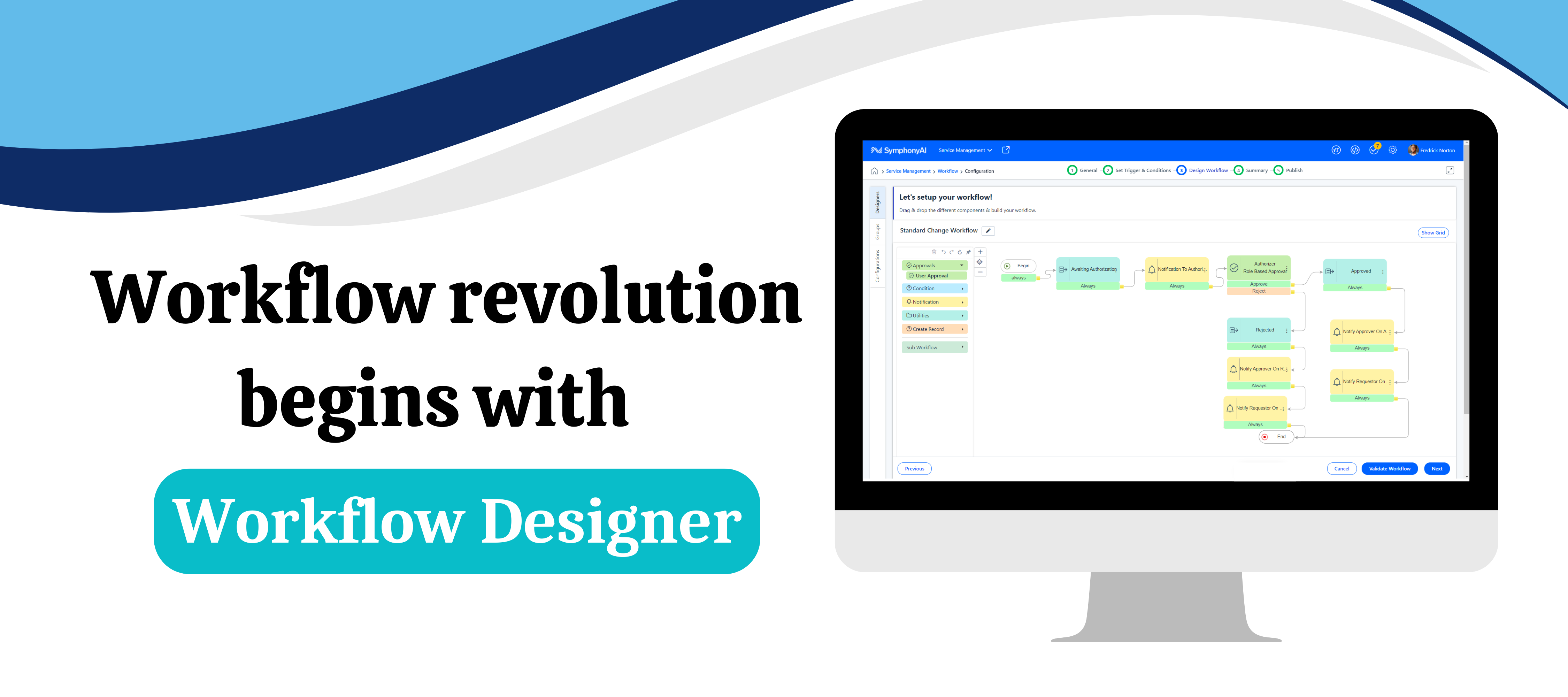
Ever dreamed of automating your workflows in minutes with a simple drag-and-drop interface? Say hello to our Workflow Designer, the game-changer in business process automation! It allows you to visually design, create, and manage workflows like never before—no coding required!💻✨ 🚀 What Makes Workflow Designer a Game-Changer? Gone are the days of complex coding and tedious manual tasks. With Workflow Designer , creating and managing workflows is as easy as drag-and-drop. Whether you're a seasoned developer or a business analyst with no coding background, this tool is built for YOU! 🔥 Key Features at a Glance: Visual Design Interface: 🎨 Construct logical workflows in a matter of minutes with our intuitive drag-and-drop functionality. Connect elements effortlessly and watch your ideas come to life! 10+ Action Components: 🛠️ From static and dynamic approvals to role-based approvals, conditions (if & switch), notifications, creating records, setting values, branching, and joining —
By default, the work order checkbox should be enabled, similar to how the Incident Management (IM) and Service Request (SR) checkboxes are enabled when the quick search tab is clicked.Version - TAHOE SP3 HF08 B003Customer - On Cloud
When it comes to managing an organization's valuable assets, two acronyms often come up: EAM (Enterprise Asset Management) and ITAM (IT Asset Management). While they share a common goal – optimizing the use and value of assets – they operate in distinct domains with different focuses.Let's break down the key differences and explore why understanding these nuances is essential for effective asset management.Enterprise Asset Management (EAM): The Big PictureEAM casts a wide net, encompassing all physical assets within an organization. This includes everything from manufacturing equipment and vehicles to facilities and infrastructure. EAM's primary goal is to ensure the reliable and efficient operation of these assets throughout their lifecycle, from acquisition to disposal.EAM in Action:Manufacturing Plant:EAM tracks maintenance schedules for conveyor belts, optimizes energy usage in HVAC systems, and manages the lifecycle of production machinery. Logistics Company: EAM monitors the cond
Many SR tickets are referred back to the user and no actions are taken.Every week we take the report and we have to cancel the tickets from the backend.Let us know how the tool can cancel the refer-backed tickets if the user takes no action after X days.
Want To Increase Analyst Productivity? Bulk Update is Here To help! Imagine eliminating the tedious task of updating records one-by-one and instead, making adjustments to multiple records with minimal effort. Introducing Bulk Update, a transformative feature on Apex! Bulk Update and History buttons for easy navigation. How Will Bulk Update Help Me? Meet Maxwell, an IT Analyst for a tech firm. Maxwell faces challenges such as updating the status of 20 records assigned to him. Manually updating each asset wouldn’t just be time-consuming for him; it also increases the risk of errors. Here’s how the bulk update can help analysts in multiple areas:Increased Efficiency: Picture this; you have hundreds of records to update, and instead of spending hours doing it manually, you can do it all in a fraction of the time. Bulk Update minimizes effort while ensuring accuracy. Improved Accuracy: We all know human error can creep in when dealing with large datasets. Bulk Update minimizes these errors
SymphonyAI Enterprise IT's onboarding & offboarding solution, makes the last day as pleasing as the first. Know moreGet Employees Productive From Day One We have heard many stories about new employees needing to wait days or weeks for everything they need to start their new job! They might get enough to start working on day one, but they’re likely not as productive as they could and should be. Such onboarding issues not only adversely affect employee productivity but also employee retention and the employer’s reputation. To help, organizations need an onboarding “day one productivity” solution that also applies the same vigor to employee offboarding. The importance of efficient employee onboardingEmployee onboarding and offboarding capabilities are crucial to an organization’s success and significantly impact the employee experience. However, too often, manual tasks such as emailing forms and storing repetitive information across the multiple involved business functions delay the
I need the API endpoint for “Give me all fields for all CIs”.Surely this must be possible?
In today's fast-paced digital landscape, businesses are constantly challenged to adapt to emerging technologies to remain competitive. Digital adoption, the process of integrating digital tools and technologies into an organization's workflows and processes, has become crucial for success. However, achieving successful digital adoption requires more than just implementing new software or tools—it requires a comprehensive strategy that addresses the needs of both the organization and its employees.To facilitate seamless integration and enhance user experience within our Apex platform for POCs, we've introduced a guided walkthrough feature. This feature aims to empower our customers, partners, and prospects to adapt to our product effortlessly, enabling them to make informed decisions and ultimately improving conversion rates. The guided tour not only encompasses predefined flows and checklists but is meticulously crafted, aligning with key strategic objectives.We've meticulously outline
In which Tahoe build or coming new build bulk creation incident feature will be enabled?
Hi, We have moved from MS365 to Google Workspace and having difficulties in accessing the reporting from Summit. Can this be integrated? Also applies to CI bulk upload as well.
How to deallocate one of the user when the asset is allocated in multiple user allocation?Customer, added 3 users via multiple user allocation, since they are working on rotating shifts. If one user left the organization, customer needs to remove one of the user and add new user for the same. How can I do that?
Currently on Tahoe platform version of Summit, has anyone integrated with third party applications by consuming their API? It doesn’t appear in the platform, outside of using orchestration, that you can develop something to consume a third party API, for example consuming vmWare vCenter’s API to query for asset data to populate the Summit Asset database and schedule it without requiring Summit Profession services to develop custom solutions using third party applications such as powershell and windows scheduler. I’m hoping to understand if there are customer facing capabilities within the Summit platform to accomplish integrations with consuming third party APIs without requiring the purchase of their Orchestration product. Thanks!
Currently, the SAM agent is sharing the entire HW and SW information of the end-user machine with the proxy server. The split job will separate the files and it will try to process the files by comparing the data. Here, if we could get only differential data from the SAM agent itself, it will be easy to process and the load will be less on the split job. The XML file size also will be less to process the data and also if the customer has more proxy servers also the data processing will be completed efficiently.
I would like to generate a Change History report which shows all of the Changes which were submitted with the “Proposed for Standard Change” checkbox AND the status of whether or not that template was approved or rejected. Which table within the reporting DataSources is the “Standard Template Status” field stored in? See screenshot attached.
What is the reason behind a SR is directly landing in to the workgroup without approvals. Only happening in mobile app with specified user level other than mobile app it is working fine in web or application.Description - When a SR is raised ticket goes for approval then after approval it will be landed in Workgroup. But in this case (mobile app+specified user level ) it is not following the approval process and also no skip approval is enabled for catalog.
Can we add mail notification for delegate when they get any request (SR/Change) in upcoming releases. As of now , Delegator has to login to Portal and check for the tickets pending for approval.
Does anyone have a process and method they use to record a Change which was implmented without being authorized/approved?If we find out that a person implmented a system change without having gone thru the Change Management process, OR if they implemented their recorded change BEFORE it was approved, how can record this in the tool to properly reflect that it was “unauthorized”?
Dear team,good day.we have summitai enterprise itsm module denali sp1. i can see “cmdb standard” assigned to enterprise license.Can we use discovery module along with it?regardsbhaskar badam
Dear Team,We have Azure AD integrated with SummitAI. We need to filter users based on location field. can we map users from one location to assign the SR/IM location Workgroup?For Example:Indian Users based on Location field in AD: IM Workgroup Category for Incident/SR: EUS INDIAChina Users based on Location field in AD: SR Workgroup Category for Incident/SR: EUS CHINAAny leads on it?Thanks in Advance.RegardsBhaskar Badam
How can I create a link to the Asset Detail of a specific Asset? While working on an SR, I can’t link to the asset because it is allocated by Location. I’d like to just be able to forward a link within the comments of the SR to the asset detail information page for the next analyst to see. How would I do that?
Can we customize the layout of the Mobile App for End Users? There are items listed that we are not currently using and we would like to remove them.
What are the different ways to onboard the assets into SummitAI?
What are pre-requisites for agent based discovery?
Already have an account? Login
No account yet? Create an account
Enter your E-mail address. We'll send you an e-mail with instructions to reset your password.